The 3rd instalment in the Study Toolbox series will look into the best ways of keeping up to date with the ever-changing field of GMP and pharmaceutical legislation. This is important not only for your viva but also throughout your QP career. There is also a requirement for continuing professional development (CPD) once you become a member of one of the joint professional bodies. Therefore keeping up to date will also help maintain your CPD to keep your professional regulator happy!
One of the most commonly asked questions in the QP viva is regarding GMP updates. This question is usually asked towards the start of the viva in order to provide a 'soft' question to help settle your nerves and get you on track for the more meatier questions ahead. The question may be phrased open-ended, eg 'what are the recent GMP updates?' or 'What recent updates are relevant to the QP?' Specific questions are more likely to be asked as a follow up to one of your previous answers, eg 'you mentioned the FMD directive, please explain'. Therefore you will need to have a good overview of recent updates but also be able to have more layers/details for specific updates relevant to QPs.
Tools for keeping up to date
 1. RSS Feeds
 My main tool for monitoring updates is via RSS feeds. You'll need a RSS reader such as Google Reader to provide a viewable platform for the incoming feeds. RSS feeds are typically linked to websites and once the story is published the link gets sent straight to your reader. This provides a useful way of skimming through all your favourite websites without having to trawl through each website in turn. Most websites will have an orange RSS symbol within their news section. Clicking on this symbol will provide a direct link for your RSS reader.
Occasionally you will receive updates via RSS before the website has been updated. For example, the recent updates to the chapters within Eudralex Vol 4 is not (yet) listed on the Eudralex section of the ec.europa.eu website. Thanks to my RSS reader these updates found their way to me and can easily be retrieved by searching within my RSS reader. If you were only looking at the Eudralex website you may have missed these crucial updates to GMP.
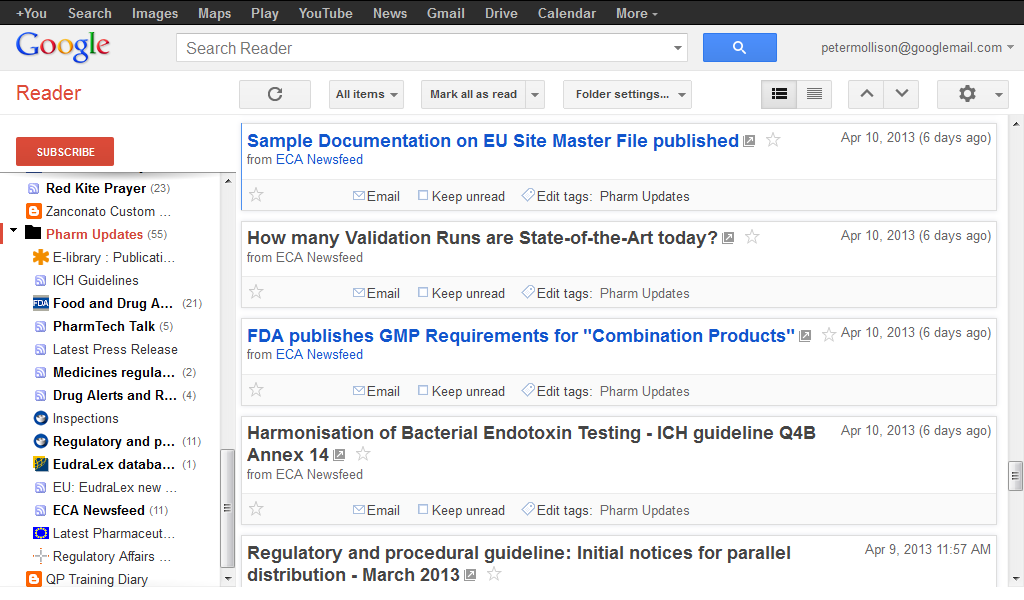 |
| Google Reader detailing my Pharmaceutical updates section |
Google reader is also available as a mobile app which allows you to sync your reader account to your smartphone/tablet for access during those long commutes on the train. Most RSS readers can also incorporate your favourite blogs which will send new posts to your reader as soon as they are published.
My top sources for RSS feeds:
MHRA
EMA
FDA
ICH
Eudralex (ec.europa.eu)
European Federation of Pharmaceutical Industries & Associations (EFPIA)
RAPS Regulatory Exchange
GMP Publishing
European Compliance Academy (ECA)
Pharma IQ
Royal Pharmaceutical Society
World Health Organisation
International Organisation for Standardisation (ISO)
2. Email Alerts
Email alerts are also a great way of keeping up to date. Most of the main players in the Pharmaceutical/GMP arena have email alerts you can sign up to. The emails can come flying in thick and fast and I would recommend setting up a dedicated email address for this if you don't want your regular inbox becoming inundating and messing up your hectic social life.
Signing up for the MHRA drug alert emails is particularly useful. Not only are the alerts emailed instantly but they are a really useful source for potential scenario-based questions and to get an good idea of what types of defects/errors make up the different types of drug alert classes. The FDA's warning letters (483) provide a great insight into serious GMP inspection findings for sites both within and outside the United States.
My top sources for Email alerts:
FDA
MHRA
European Compliance Academy (ECA)
3. Twitter
I am only a recent convert to Twitter but have found it useful for providing information and links to websites & articles that you may not have originally thought of. Twitter lends itself well to the mobile platforms due to the (mostly) text only interface.
Again, all the main culprits have twitter accounts such as MHRA, EMA, RPS etc but I tend to use Twitter for following specialist individuals as opposed to large organisations. These specialist individuals usually dont have the resources for setting up RSS feeds or comprehensive email alerts systems and hence I let my Google reader account take care of information from the large organisations. When you find someone to follow it is always worth looking to see who they are following themselves. This will likely increase your scope and identify further people/organisations to follow.
These are some of the useful active accounts I'm following:
@PharmaIQ
@QPQuandary
@AlecGaffney
@PharmaNews
@BioPharmIntl
@Inspiredpharma
@PharmTechGroup
@EURlex
3. Other Social Media & Journals
There are quite a few additional sources available to you. Facebook, journals, blogs, LinkedIn to name but a few. I tend not to rely on these for providing updates to relevant GMP/legislation/guidelines. I've found these sources to be more useful for general information, networking and job hunting!
I still like to occasionally browse some of the high impact journals surrounding subjects that I have a personal interest in. These include; Cancer Cell, Cell, Nature Cancer Reviews, Science & NEJM. These obviously wont keep you up to date with the latest GMP developments but will provide background knowledge to scientific progresses in disease states relevant to your particular dosage forms. This background knowledge may also help prepare you for what is to come in the future with regards to novel treatments - they'll all hopefully need QP certification one day!
Using MindMaps to manage updates
Throughout your QP training there will be a number of important updates that you will need to remember for your viva. Certainly in the last 6 months there has been enough GMP updates to keep us all busy. The QP assessors will likely expect you to not just list all the updates but provide detail on updates that are relevant to your current practice. With each new update you can amend your mindmap to reflect the changes and doing this as you go along should help reduce the burden once you get closer to viva day.
The image of my mindmap above shows the outline of all the relevant areas of updates that I feel I should be aware of. I haven't included FDA updates within my own map as my current area of practice does not include any drugs marketed in the USA.
As mentioned in my previous post mindmaps are a really useful tool for providing layers of details to particular subjects. GMP updates is a good example of making the most out of mindmaps. The image above has focused in on GMP updates and the first layer is detailing the relevant years. I doubt you'll be expected to know the explicit details of updates going back 5 years. I've only gone back to 2008 because this was the last major update of Annex 1 and Sterile products will be my specialist dosage form.
Summary
I am only a recent convert to Twitter but have found it useful for providing information and links to websites & articles that you may not have originally thought of. Twitter lends itself well to the mobile platforms due to the (mostly) text only interface.
Again, all the main culprits have twitter accounts such as MHRA, EMA, RPS etc but I tend to use Twitter for following specialist individuals as opposed to large organisations. These specialist individuals usually dont have the resources for setting up RSS feeds or comprehensive email alerts systems and hence I let my Google reader account take care of information from the large organisations. When you find someone to follow it is always worth looking to see who they are following themselves. This will likely increase your scope and identify further people/organisations to follow.
These are some of the useful active accounts I'm following:
@PharmaIQ
@QPQuandary
@AlecGaffney
@PharmaNews
@BioPharmIntl
@Inspiredpharma
@PharmTechGroup
@EURlex
3. Other Social Media & Journals
There are quite a few additional sources available to you. Facebook, journals, blogs, LinkedIn to name but a few. I tend not to rely on these for providing updates to relevant GMP/legislation/guidelines. I've found these sources to be more useful for general information, networking and job hunting!
I still like to occasionally browse some of the high impact journals surrounding subjects that I have a personal interest in. These include; Cancer Cell, Cell, Nature Cancer Reviews, Science & NEJM. These obviously wont keep you up to date with the latest GMP developments but will provide background knowledge to scientific progresses in disease states relevant to your particular dosage forms. This background knowledge may also help prepare you for what is to come in the future with regards to novel treatments - they'll all hopefully need QP certification one day!
Using MindMaps to manage updates
Throughout your QP training there will be a number of important updates that you will need to remember for your viva. Certainly in the last 6 months there has been enough GMP updates to keep us all busy. The QP assessors will likely expect you to not just list all the updates but provide detail on updates that are relevant to your current practice. With each new update you can amend your mindmap to reflect the changes and doing this as you go along should help reduce the burden once you get closer to viva day.
 |
| My constantly evolving updates Mindmap. |
The image of my mindmap above shows the outline of all the relevant areas of updates that I feel I should be aware of. I haven't included FDA updates within my own map as my current area of practice does not include any drugs marketed in the USA.
 |
| 2nd & 3rd layers of updates mindmap showing GMP updates. |
As mentioned in my previous post mindmaps are a really useful tool for providing layers of details to particular subjects. GMP updates is a good example of making the most out of mindmaps. The image above has focused in on GMP updates and the first layer is detailing the relevant years. I doubt you'll be expected to know the explicit details of updates going back 5 years. I've only gone back to 2008 because this was the last major update of Annex 1 and Sterile products will be my specialist dosage form.
 |
| 3rd, 4th & 5th layers of updates Mindmap for the chapter 5 update in 2013. The layering technique is hopefully clear from the image above. |
Summary
GMP & legislature updates are an important part for both your viva and for your future life as a QP. We are lucky to live in such an electronic age where all relevant updates can be immediately disseminated throughout the QP community.
Taking advantage of the available tools mentioned in the post should help these updates find you as opposed to you going out hunting for them.
Study Toolbox Part 1: The Onion
Study Toolbox Part 2: Introduction to Mindmaps


